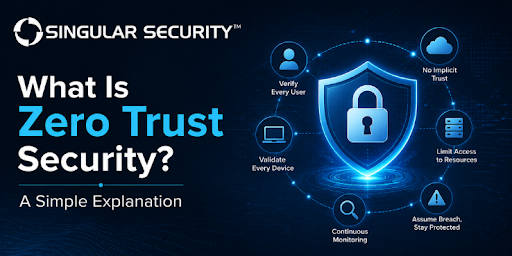
Zero trust security is a cybersecurity model built on one rule: trust nothing and verify everything, every time. It doesn’t matter if a user is sitting inside the corporate office or logging in from home every request for access to data, an app, or a system gets checked against who is asking, what device they’re using, and whether that specific access actually makes sense. Nothing gets a free pass just because it’s already “inside” the network.
Did you know?More than 90% of successful cyberattacks start with a phishing email, according to the Cybersecurity and Infrastructure Security Agency (CISA) precisely the kind of stolen-credential entry point zero trust verification is designed to catch.
That single idea has quietly become the backbone of modern network security. In this guide, we’ll break down what the zero trust model actually means, how zero trust architecture works in practice, and why more businesses are treating zero trust cybersecurity as their new baseline instead of an optional upgrade.
Key Takeaways
- Zero trust security replaces “trust but verify” with “never trust, always verify” access is never automatic, no matter where a request comes from.
- The zero trust model relies on continuous identity verification, least-privilege access, and micro-segmentation instead of one large trusted network perimeter.
- NIST Special Publication 800-207 is the reference framework most zero trust architecture designs are built around.
- Identity and device checks are usually where a zero trust rollout starts, not network hardware.
- Zero trust doesn’t require replacing an entire IT stack overnight; most organizations adopt it in phases.
- Remote work, cloud applications, and stolen-credential attacks are the main reasons zero trust cybersecurity has become standard practice rather than a nice-to-have.
What Is Zero Trust Security?
At its core, zero trust security is built on a simple assumption: any user, device, or application could be compromised, so none of them receive automatic trust. Every access request is evaluated on its own who’s asking, from what device, at what time, and whether that access lines up with normal behavior.
This isn’t a single product you buy and install. It’s a security approach, formalized in NIST Special Publication 800-207, that treats identity, not network location as the main line of defense. Instead of asking “is this request coming from inside our network?”, a zero trust system asks “should this specific user, on this specific device, be allowed to do this specific thing, right now?”
How Does the Zero Trust Model Work?
Picture the old way of doing network security: a firewall around the outside, and once you’re past it, you’re mostly trusted to move around freely. That’s the “castle-and-moat” model, and it works fine right up until someone gets inside the walls through a phishing email, a stolen password, or a compromised vendor account. After that, there’s often nothing stopping them from moving sideways through the network.
The zero trust model removes the “inside is safe” assumption entirely. Every request for access a laptop pulling files from a server, or one application talking to another goes through the same checks:
- Verified identity confirms who (or what) is actually making the request, usually with multi-factor authentication.
- Check the device to confirm it’s patched, managed, and not showing signs of compromise.
- Apply least-privilege access grants only the specific access needed for that task, nothing more.
- Segment the network break systems into smaller zones so a breach in one area can’t spread freely.
- Monitor continuously keeps verifying after access is granted, not just at login.
We go deeper into the specific controls behind each of these steps in Trust Security Works to Stop Cyber Attacks, which walks through how this plays out on a real business network.
The Core Principles Behind Zero Trust Architecture
- Verify explicitly every request is authenticated and authorized using all available signals, not assumptions.
- Use least-privilege access users and systems get the minimum access required, for the minimum time required.
- Assume breach design the environment as if an attacker is already inside, and limit what they could reach.
Zero Trust Architecture vs. Traditional Network Security
The easiest way to see the difference is side by side:
| Factor | Traditional Network Security | Zero Trust Architecture |
|---|---|---|
| Trust model | Trusted once inside the perimeter | Nothing trusted by default, ever |
| Access | Broad access after one login | Granular, per-resource access |
| Core assumption | The internal network is safe | Assume the network is already compromised |
| Best fit for | Static, on-premise environments | Cloud, hybrid, and remote workforces |
| Failure mode | One breach can mean wide exposure | One breach stays contained to a small blast radius |
Traditional network security was built for a world where employees worked from one office, on one network, using company-owned hardware. That world doesn’t really exist anymore which is exactly why zero trust cybersecurity has become the default recommendation instead of an optional upgrade.
Key Components of a Zero Trust Architecture
Identity and Access Management (IAM)
Identity is the front door of a zero trust model, and it’s usually the first thing organizations fix. That means multi-factor authentication everywhere, tighter control over who has admin rights, and removing standing access nobody remembers granting. We cover this piece in more depth in The Role of Zero Trust in Identity and Access Management Services.
Device and Endpoint Verification
A verified user on a compromised laptop is still a risk. Zero trust systems check device health patch status, encryption, whether it’s a managed device at all before granting access, not just who’s logging in.
Micro-Segmentation and Least-Privilege Access
Instead of one flat network where anything can talk to anything, zero trust architecture breaks the environment into smaller segments. If one segment is compromised, the damage stays contained. Combined with least-privilege access, this is what actually shrinks the size of a breach when not if something gets through. Our guide to cloud identity and access management covers how this looks once workloads move off-premise.
Why Zero Trust Cybersecurity Matters for Businesses Right Now
Attackers don’t need to break through a firewall anymore. They need one employee to click one bad link, or one reused password from an old data breach. Once they’re in, a flat, perimeter-based network hands them the keys to everything else.
That’s the exact gap zero trust closes. It assumes credentials will eventually be compromised because statistically, they will be and build the system so one stolen login doesn’t turn into a full network compromise. This matters even more now that most companies run a mix of cloud applications, remote employees, and third-party vendors, none of which fit neatly inside an old-style network perimeter.
If you’re comparing vendors or tools for this transition, our breakdown of zero trust solutions that help block lateral threats and contain breaches is a useful next read.
An Honest Take on Rolling Out Zero Trust
Having watched a number of businesses go through this transition, the pattern is fairly consistent: organizations that treat zero trust as an identity-first project move faster and run into fewer headaches than those that start by overhauling network hardware. Get multi-factor authentication, access reviews, and device checks solid first segmentation and more advanced controls layer on top far more smoothly once that identity foundation is in place.
Common Mistakes When Adopting a Zero Trust Model
- Treating it as a single product zero trust is a strategy applied across identity, devices, networks, applications, and data, not one appliance you install.
- Ignoring legacy systems, older applications that can’t support modern authentication get left out of the plan, creating an easy path around the new controls.
- Skipping devices and IoT visibility unmanaged devices are often the easiest way into a network, and the easiest to forget about.
- No plan for continuous monitoring verifying identity once at login isn’t zero trust; checking has to continue throughout the session.
- Rolling it out all at once a phased approach, starting with identity, gives teams time to fix access sprawl without disrupting operations.
Zero Trust Security in Plain English
In plain English: zero trust security means nobody, not an employee, not a vendor, not even your own IT team gets automatic access to anything. Every request gets checked against who’s asking, what device they’re using, and whether that specific access makes sense right now. If something looks off, access gets denied by default, not just flagged for someone to review later.
Ready to Move Toward a Zero Trust Model?
Zero trust security isn’t a switch you flip overnight, but it’s also not something worth putting off until a breach forces the issue. Whether you’re just getting started with identity controls or already planning a full zero trust architecture rollout, getting the sequencing right is what separates a smooth transition from a stalled one.
Singular Security helps businesses build zero trust environments around real identity and network security needs, not a generic checklist. Talk to our team about network security services to see where your current setup stands and what a realistic path to zero trust looks like for your business.
Frequently Asked Questions
Q1: What is zero trust security in simple terms?
It’s a cybersecurity approach where no user or device is trusted automatically, even if they’re already inside the network. Every access request is verified based on identity, device health, and context before it’s granted.
Q2: What’s the difference between zero trust and a VPN?
A VPN extends trust to anyone who connects to it, then usually grants broad access to the internal network. Zero trust does the opposite: it verifies every request individually and grants only the specific access needed, regardless of how someone connected.
Q3: How long does it take to implement a zero trust model?
There’s no fixed timeline; it depends on the size of the organization and how outdated the existing infrastructure is. Most businesses roll it out in phases over several months to a couple of years, usually starting with identity and access controls.
Q4: Do small and mid-sized businesses actually need zero trust cybersecurity?
Yes. Attackers don’t target company size, they target weak, reused credentials and unmanaged devices, and smaller businesses often have more of both. The core practices, like MFA, least-privilege access, and device checks, scale down just fine.
Q5: What are the five pillars of CISA’s Zero Trust Maturity Model?
Identity, Devices, Networks, Applications and Workloads, and Data with visibility, automation, and governance layered across all five, as outlined by the Cybersecurity and Infrastructure Security Agency.